Your agent runs as you: governing local AI agents with Microsoft Defender and BeyondTrust
Coding agents like Claude Code and Copilot CLI inherit your identity, your tokens and your reach. A deep dive into Microsoft Defender's local agent discovery and runtime protection, BeyondTrust's privilege-based approach, and what that means for endpoint management teams.
Status check (October 2026): local agent discovery is available on Windows, with macOS and WSL in preview. Runtime protection is a Windows-only public preview. BeyondTrust’s AI Agent Security was in private beta at the time of writing. Settings, coverage and licensing are still moving. Verify against the vendor documentation linked at the end before you build a design on this.
The problem in one sentence
When someone starts Claude Code, Copilot CLI or Cursor on a managed laptop, the agent runs as that person: same user context, same tokens, same SSO sessions, same cloud CLI profiles, same network position.
That sounds obvious, but it quietly breaks a set of assumptions our endpoint stack has been built on for twenty years. We recently attended a BeyondTrust session on exactly this topic at AppManagEvent in Utrecht, and the speaker listed those assumptions neatly:
- A human is at the keyboard making each decision.
- The thing running is a known binary from a known installer.
- A user identity maps to one person.
- Actions happen at human speed, one at a time.
- The audit trail is a username, and that is enough.
An agent invalidates all five. It is a non-human actor wearing a human identity, acting at machine speed, assembling commands nobody packaged or tested. When it misbehaves, the logs say you did it.
What makes this hard is that the most likely failure isn’t an attack. It’s an agent doing exactly what it was asked, with more reach than anyone intended. Two examples: an agent stands up infrastructure and exposes an endpoint because someone in marketing asked for a landing page, or a developer’s agent happily lists production buckets because the AWS profile was right there. Add prompt injection (hidden instructions in a README, web page or tool response) and the same reach becomes an exfiltration path.
From a device management perspective, this is ours to solve. Agents live on the endpoint, so the endpoint is where visibility and control have to start.
Why agents are actually easier to spot than people
This is the part I find genuinely interesting. Humans are noisy in unpredictable ways. Agents are noisy in predictable ways, which makes them observable:
- Known launch points. Agents start from recognisable binaries and host processes, such as a CLI, a desktop app, an IDE or a VS Code extension.
- Chatty by design. An agent loop is a constant stream of tool calls, file reads, shell commands and network requests. That rhythm doesn’t look like a person.
- Known destinations. They talk to a small set of LLM inference endpoints over standard HTTPS.
- Open standards. MCP is a published protocol, and agents keep their MCP configuration in files on disk. Read the config and you know what an agent can reach before it reaches it.
- Hooks. The major coding agents expose vendor-supported event interfaces (hooks) at defined points in their loop. A security product can plug into those to see, and stop, what’s about to happen.
Both approaches in this post lean on exactly these properties. Microsoft uses them to find agents and inspect their content. BeyondTrust uses them to tell the agent apart from the human and apply privilege policy to each action. Let’s start with Microsoft, because it lands in tooling most EMM teams already run.
Part 1: Local AI agent discovery
What you get
Once devices are onboarded to Defender for Endpoint, discovery starts automatically. There’s no extra deployment, script or policy. In the Defender portal under Assets → AI agents → Local agents you get:
- An inventory of discovered agents, tied to the device and the account they run under, plus version and first-seen date.
- MCP server configuration per agent: remote servers (name, type, endpoint) and local servers, including the command that starts them.
- Posture signals in the agent details, notably whether the agent auto-approves its own actions and whether its host process is trusted.
- An exposure map linking agents to devices, identities and the resources those identities can access.
- Advanced hunting through the
AgentsInfotable, combined with the exposure graph tables.
Coverage is broad. On Windows the support matrix lists around 60 agents and variants. They range from Claude Code, Codex CLI, Gemini CLI and Copilot CLI to Cursor, Windsurf, Claude Desktop, ChatGPT Desktop, Ollama, LM Studio, OpenClaw-style agents, and VS Code extensions such as Cline and Roo Code. macOS coverage is similar but in preview. Claude Code, Codex CLI and Copilot CLI are also discovered inside WSL (preview), which matters because that’s exactly where a lot of developers run them.
Three details that matter in practice
1. Discovery is activity-based, not install-based. Defender lists an agent once it observes agent activity. An installed but unused agent may not show up. Don’t treat the inventory as a software inventory. For “what’s installed”, keep using your existing app inventory in Intune or Defender Vulnerability Management.
2. An “agent” is user + device + agent type. Claude Code used in fifteen repos by one person on one laptop is one entry. The same tool used by two accounts on one device is two entries. Keep this in mind when you count.
3. Licensing splits the feature in two.
| Capability | Minimum license |
|---|---|
Inventory, agent details, MCP servers, advanced hunting (AgentsInfo) | Defender for Endpoint Plan 2 (included in M365 E5/E7) |
| Risk level, risk indicators, security recommendations | Microsoft 365 E7, or Agent 365 together with MDE Plan 2 |
Also note that discovery is supported in the commercial cloud only, not in sovereign or national clouds.
A first hunting query
The autoApprove flag is the one I’d look at first. An agent that doesn’t ask before acting is running unsupervised with the user’s full reach. A minimal query:
// Local agents that act without asking, latest profile per agent
AgentsInfo
| where Platform == "LocalAgents"
| summarize arg_max(Timestamp, Name, Version, LifecycleStatus, RawAgentInfo) by AgentId
| where LifecycleStatus !in~ ("Deleted", "Uninstalled")
| extend m = RawAgentInfo.localAgentMetadata
| where tostring(m.autoApprove) =~ "true"
| project Agent = Name, Version,
          Vendor  = tostring(m.vendor),
          Device  = tostring(m.deviceName),
          Account = tostring(m.accountName),
          Trusted = tostring(m.trustedProcess)
| sort by Device asc
Two gotchas. AgentsInfo writes a new record every time a profile changes, so always take the latest record per AgentId. And autoApprove and trustedProcess are strings, not booleans. Microsoft’s documentation has more elaborate examples that join to the exposure graph to rank users by the critical assets their agents can reach. That’s the query to run before you talk to your CISO.
Part 2: AI agent runtime protection
Discovery tells you what’s there. Runtime protection is the first piece that acts.
What it inspects
Defender inspects three points in the agent loop: the incoming prompt, the tool request before it executes, and the tool response after it returns. If it finds a prompt injection, it can stop the malicious content from travelling further through the loop, or prevent the harmful tool call from running.
Microsoft’s own example illustrates it well. A coding agent fetches documentation that contains hidden text telling it to read .env and post the contents to an external URL. Defender catches the injection in the tool response and blocks the action before anything leaves the device.
Two inspection methods
| Method | How it works | Supported today (Windows, preview) |
|---|---|---|
| Agent-native event inspection | Plugs into the agent’s vendor-supported hooks. Inline checks per event rather than continuous process monitoring. | Claude Code, GitHub Copilot CLI, GitHub Copilot app, Claude Desktop (Code mode), and the VS Code extensions for Copilot and Claude Code |
| Network inspection | Inspects agent-to-LLM traffic in transit for agents without hooks | OpenClaw, Ollama Desktop, ChatGPT Classic, ChatGPT Desktop (Chat mode) |
Network inspection doesn’t work for agents that use certificate pinning or HTTP/3. That’s a structural limit, not a temporary one.
Modes and user experience
Both methods support Disabled, Audit and Block.
- Block: the user sees a message in the agent’s own UI plus a Windows toast notification. The event lands in Protection history, and a “Suspicious AI prompt injection” alert is raised and correlated into incidents. Severity runs from Low to Critical depending on assessed risk.
- Audit: the action continues, and the alert is raised as Informational. That lets the SOC see what would have been blocked without it being treated as an active threat.
The setting is covered by tamper protection.
Prerequisites
- License: MDE Plan 2, M365 E5, Agent 365 or M365 E7.
- Defender Antivirus in active mode with real-time protection on, and current platform, engine and intelligence updates. The single-device procedure checks for security intelligence version
1.451.224.0or later. - During the preview, Microsoft asks you to put test devices on the Beta Channel for platform and engine updates.
Rolling it out
Single test device (PowerShell, elevated):
# Agents with hooks (Claude Code, Copilot CLI, ...)
Set-MpPreference -AiAgentProtection Audit

# Agents without hooks, via LLM traffic inspection
Set-MpPreference -AiAgentNetworkInspection Audit

# Verify
Get-MpPreference | Select-Object AiAgentProtection, AiAgentNetworkInspection
Close and reopen any terminals afterwards. Agents started in an existing session won’t pick up the change.
At scale with Intune:
- Endpoint security → Antivirus → Create policy, platform Windows, profile Microsoft Defender AI agent runtime protection.
- Set Ai Agent Protection to
Audit(laterBlock) and assign to a pilot group. - Note that the profile covers only agent-native event inspection. For network inspection, deploy a platform script with
Set-MpPreference -AiAgentNetworkInspection Audit, with Run this script using the logged on credentials set to No so it runs as SYSTEM. Intune runs platform scripts once, so changing the mode later means editing the script or policy to force a rerun. - Verify per device in the Defender portal: device page → Configuration management → Effective settings → Ai Agent Protection.
If you manage endpoint security from the Defender portal instead, the same template exists there. For devices under Defender security settings management that aren’t enrolled in Intune, target Entra device groups, because user targeting isn’t supported.
Microsoft’s recommended sequence: audit on a small group where agents are actually used → review alerts for one to two weeks and mark false positives → expand in audit → switch to block per device group. That’s the same discipline we’ve always used for ASR rules and application control, and for the same reason.
Part 3: Blocking agents you don’t sanction
Runtime protection protects the agents you allow. For the ones you don’t, Agent 365 adds a blunt but useful instrument. The Shadow AI page in the Microsoft 365 admin center can block an unsanctioned local agent. Enabling it creates an Intune policy (for example “A365 - Block OpenClaw”) that blocks common execution paths on enrolled Windows devices. “Common execution paths” is the honest wording: treat it as raising the bar, not as an airtight application control boundary. If you already run WDAC/App Control for Business, that remains the stronger control.
Where Defender stops
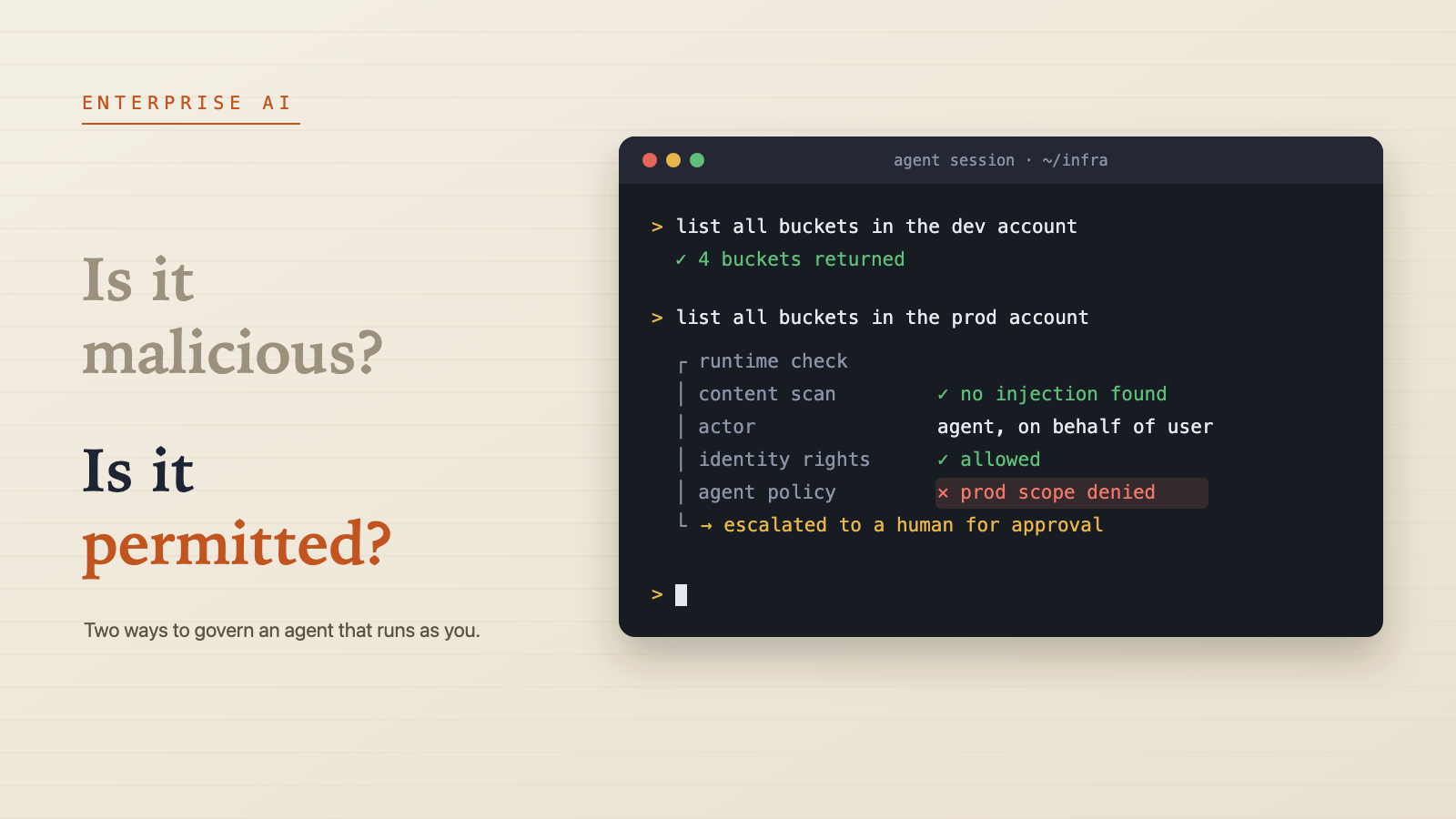
Defender’s runtime protection asks one question: is this content malicious? It’s built around prompt injection. That’s valuable, but it’s the EDR-style question. The harder question, and the one the Utrecht session hammered on, is: is this action permitted, for this actor, right now?
Take the scenario from the session’s live demo. A developer has a valid AWS profile for production. Their agent is asked to list production buckets. Nothing is injected and nothing is malicious. IAM allows it, because the human is allowed. Defender has no reason to intervene. The only control that stops it is one that distinguishes the agent from the human and applies a policy to the agent specifically.
As far as I can see, the Microsoft stack today gives you three pieces:
- Visibility: which agents, where, under whom, with which MCP servers and how much reach.
- Threat protection: prompt injection detection and blocking for supported agents.
- Coarse allow/deny: blocking unsanctioned agents entirely.
What it doesn’t (yet) give you is fine-grained, per-action authorization for sanctioned agents. That means rules like “this agent may read the repo and call these MCP tools, but may not touch production credentials or open connections to these hosts”. That’s exactly the gap BeyondTrust is going after.
Part 4: The privilege approach, BeyondTrust AI Agent Security
BeyondTrust comes at the problem from Endpoint Privilege Management, the product family that removes local admin rights and elevates applications just in time. Their argument is simple: we already solved standing privilege for humans, so apply the same discipline to the agent that inherits the human’s privilege.
What it is
AI Agent Security is a module on BeyondTrust’s Pathfinder platform. It was announced at the end of June 2026 as a private beta for design partners, with general availability announced for fall 2026, initially as an add-on to Endpoint Privilege Management. BeyondTrust names Claude Code, Microsoft Copilot, Cursor and OpenAI Codex among the tools it covers.
The product is built around three capabilities:
- Discover. Find every AI assistant, copilot and agent on the endpoint, including shadow AI, and map what each one can reach.
- Decide before the action. Approved AI tools get only the permissions their task needs, instead of inheriting the user’s full credentials by default. Policy also governs which MCP servers, plugins and external services an agent may connect to.
- Attribute. Trace execution chains back to their source, so each action is recorded as initiated by a human or by an agent. That fixes the “the logs say you did it” problem.
How it works, as shown in the session
The core idea is separating the agent from the human while they share one identity. Policy is checked at runtime on the endpoint, for each type of action the agent can take: running a process, executing a command line, reading a file, calling an MCP tool, opening a connection (layer 4) or making an HTTPS request (layer 7), and ultimately reaching production. The human keeps their normal rights. The agent gets the subset you define.
Three design choices stood out to me:
- Approved pathways instead of only blocks. Agentic tasks get secure routes to completion, partly through the agents’ own hooks. When there is no approved path, the request escalates to a person just in time instead of failing silently. That is JIT elevation, applied to a non-human actor.
- Curated policies. You don’t start from an empty policy set. BeyondTrust’s research team, Phantom Labs, maintains risk-rated policies based on how agents actually behave, including research on how agents escape sandboxes and evade EDR. In the session they mentioned a one-click block on an entire model family as an example.
- The allowlisting rollout discipline. You start in observation mode to learn what normal looks like, then move to warn, then to enforce. New policies can be simulated by replaying them against agent activity already recorded in your own environment, so you see the impact before any user feels it.
The demo
The demo was the most convincing part of the session. In a Windows terminal, Claude Code was asked to list S3 buckets in a development account, which worked. It was then asked to do the same in the production account. The command was stopped by a Pathfinder policy that explicitly denies AI-driven access to the production AWS account. That happened even though IAM allowed it, because the policy enforces production scope at the network layer.
What I found most interesting is what happened next. The agent received a structured message with the violated policy name, the action, the resource and a link to request an exception. It then reported back that this was a deliberate guardrail rather than a permissions issue, and that it would not try to route around it via another tool or SDK path. That’s the right behaviour from the agent. It’s also exactly why enforcement needs to sit outside the agent, at the action level: a less well-behaved agent might simply try the next path.
Defender and BeyondTrust side by side
| Microsoft Defender for Endpoint | BeyondTrust AI Agent Security | |
|---|---|---|
| Core question | Is this content malicious? | Is this action permitted, for this actor, now? |
| Primary threat model | Prompt injection | Unauthorised outcomes from agents doing what they were told |
| Agent vs human | Agent visible in inventory, but runs with the user’s rights | Agent gets its own policy subset within the user’s context |
| Enforcement points | Agent hooks and LLM network traffic | Process, command line, file, MCP call, network L4/L7, production scope |
| No-match behaviour | Audit or block | Escalate to a human, just in time |
| Rollout model | Audit → block | Observe → warn → enforce, with policy simulation |
| Fit for EMM teams | Native to Intune and Defender, already licensed in E5/E7 | Extra product, natural fit where BeyondTrust EPM is already deployed |
| Maturity (Oct 2026) | Discovery available; runtime protection in preview | Private beta, GA announced for fall 2026 |
My reading: these aren’t competitors so much as layers. The session itself argued you’ll end up with gateways, EDR-style detection and endpoint runtime policy anyway, and that the real decision is the order in which you put those fences up. Defender gives you the inventory and the injection layer at little extra cost. A privilege layer like BeyondTrust’s answers the authorization question that Defender doesn’t ask. CrowdStrike’s Falcon Guardian, which includes agent access controls, shows the rest of the market is heading the same way.
There’s also a useful native layer you shouldn’t skip. Coding agents such as Claude Code support centrally managed settings, including permission allow/deny rules and hooks, that users can’t override. As EMM admins we can deliver those through Intune today. A deny rule on production CLI profiles is crude, but it is per-agent authorization, and it costs nothing.
A practical starting plan
If I were rolling this out for a customer next week:
- Measure first. Confirm MDE onboarding and AV active mode, then just look at the Local agents inventory for two weeks. Assume it’ll be bigger than anyone expects.
- Hunt for auto-approve. Run the query above and the exposure-graph variant. Agents that act unsupervised on critical devices or for privileged users are your top list.
- Decide what’s sanctioned. Pick the agents you support, and block the rest through Agent 365 Shadow AI or App Control.
- Pilot runtime protection in audit. Use a developer device group, both inspection methods, one to two weeks of alert review, then block.
- Harden the sanctioned agents natively. Push managed settings for permissions and hooks via Intune, and keep production credentials out of default profiles on developer machines.
- Plan the authorization layer. Per-action policy for sanctioned agents is the real gap. If the customer already runs BeyondTrust EPM, join the beta or plan an evaluation at GA. Otherwise, put EPM-style agent control on the roadmap.
The bigger picture
The principle doesn’t change: don’t grant access by default, grant only what’s needed, only when it’s needed, and make every use visible. What changes is that we now apply it to a non-human actor that shares a human’s identity. Microsoft has delivered solid groundwork in visibility and injection protection, in tooling EMM teams already operate. BeyondTrust showed in Utrecht what the next layer looks like: separating the agent from the human and governing each action just in time. That authorization layer is where the market will be fought over.
Your agent runs as you. Until our tooling can tell the two apart, we’ll have to govern it like you, and then some.
Sources and further reading
- Microsoft Learn: Local AI agent discovery with Microsoft Defender for Endpoint
- Microsoft Learn: Discover local AI agents (inventory, licensing, hunting)
- Microsoft Learn: AI agent runtime protection (Preview)
- Microsoft Learn: Set up AI agent runtime protection
- Microsoft Learn: Defender for Endpoint AI agent support matrix
- Microsoft Zero Trust Assessment: Block unsanctioned local agents on managed endpoints
- BeyondTrust: AI Agent Security product page
- BeyondTrust: Press release, AI Agent Security (June 2026)
- IT Brief UK: BeyondTrust launches AI agent security beta for endpoints